
CBSE Class 10 Computer Application 2024 Question Paper with Solution PDF (Available)


Content Strategist | Updated On - Jan 5, 2025
CBSE Class 10 Question Papers are the most important study material for effective exam preparation. We at Zollege have provided all CBSE Class 10 Previous Year Papers with Solution PDFs here.
Students can freely download the CBSE Class 10 previous year's question paper PDFs along with their solutions here. We strongly encourage CBSE 10 aspirants to scan through all the CBSE Class 10 Question Paper to know the overall difficulty level, CBSE Class 10 Syllabus and understand the changes in CBSE Class 10 Exam Pattern over the years.
CBSE Class 10 Computer Application 2024 Question Paper with Solution PDF
| CBSE Class 10 Computer Application 2024 Question Paper with Solution PDF |  Download Download |
Check Solution |
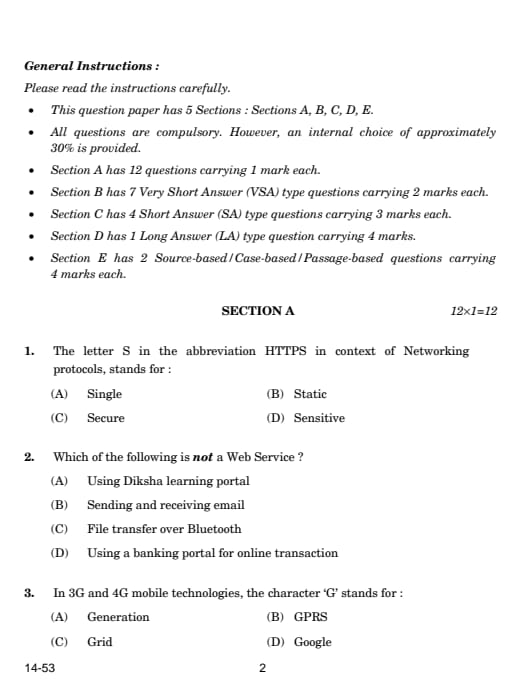
Question 1:
The letter S in the abbreviation HTTPS in the context of Networking protocols stands for:
Solution:
The 'S' in HTTPS stands for Secure. HTTPS is a secure version of HTTP that encrypts the data exchanged between the web server and the browser, ensuring that sensitive information remains private.
Read More
Always use HTTPS while browsing, especially when entering sensitive information like passwords, to ensure your data is secure.
Question 2:
Which of the following is not a Web Service?
Solution:
Web services are online services accessed through the internet, such as the Diksha portal, email, and online banking. Bluetooth is a local wireless communication technology, not an internet-based service.
Read More
When working with web services, make sure you are using the internet to access them. Bluetooth is for local communication, not web-based services.
Question 3:
In 3G and 4G mobile technologies, the character 'G' stands for:
Solution:
The 'G' in 3G and 4G stands for Generation. These terms represent the third and fourth generations of mobile network technology, which provide faster speeds and enhanced services.
Read More
The "G" indicates the generation of mobile network technology, with each new generation offering better data speed and connectivity.
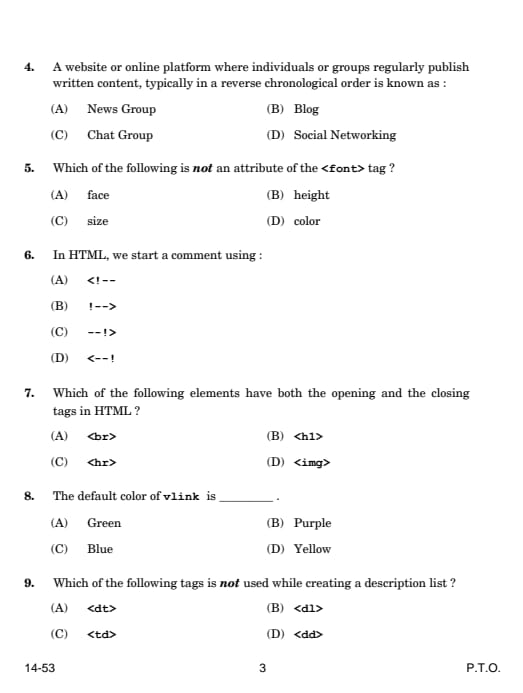
Question 4:
A website or online platform where individuals or groups regularly publish written content, typically in reverse chronological order is known as:
Solution:
A Blog is a website where content is published regularly, with the newest posts appearing first. Blogs are often used for personal expression, professional information, or hobbies.
Read More
Blogs are great for sharing information regularly. They are often used for storytelling, education, and keeping readers updated.
Question 5:
Which of the following is not an attribute of the <font> tag?
Solution:
The <font> tag in HTML supports attributes like face, size, and color, but height is not a valid attribute for the <font> tag.
Read More
The <font> tag is now outdated in modern HTML. It's better to use CSS for styling text and elements.
Question 6:
In HTML, we start a comment using:
Read More
Use comments in your HTML code to leave notes or explain complex sections of your code. This helps you and others understand it better.
Question 7:
Which of the following elements have both the opening and the closing tags in HTML?
Solution:
The <h1> tag is used to define headings and it requires both an opening and a closing tag. Tags like <br> (line break), <hr> (horizontal rule), and <img> (image) are self-closing.
Read More
Heading tags like <h1> to <h6> always require closing tags. Self-closing tags like <br> do not.
Question 8:
The default color of vlink is:
Solution:
In HTML, the default color for visited links (vlink) is purple. This is the standard style used by browsers unless it is changed using CSS.
Read More
You can change the colors of links (visited or not) using CSS to match the design of your website.
Question 9:
Which of the following tags is not used while creating a description list?
Solution:
- <dl> is the tag used for creating a description list.
- <dt> is used to define the term in a description list.
- <dd> is used to describe the term in a description list.
- <td> is used for defining table data, not for description lists.
Read More
<td> is used in tables, not in description lists! In description lists, you use <dl>, <dt>, and <dd> to list terms and their descriptions.
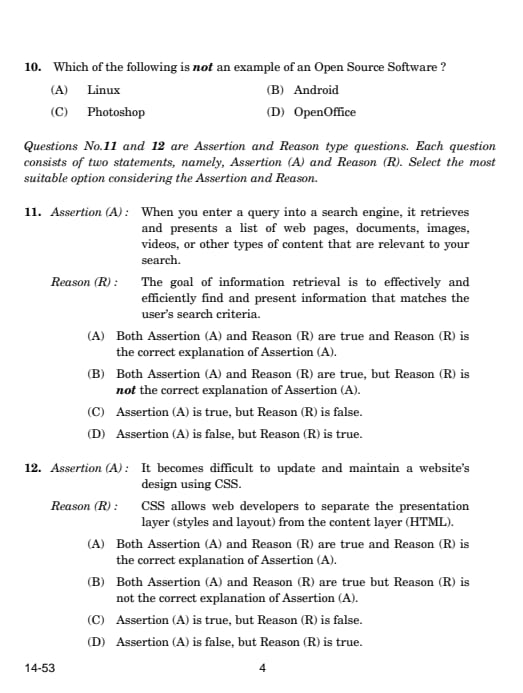
Question 10:
Which of the following is not an example of an Open Source Software?
Solution:
Photoshop is proprietary software developed by Adobe. This means its source code is not available for public use or modification. On the other hand, Linux, Android, and OpenOffice are open-source software, meaning their source code is freely available and can be modified or distributed by anyone.
Read More
Open-source software promotes collaboration and innovation, allowing users to modify and improve the software freely.
Question 11:
Assertion (A): When you enter a query into a search engine, it retrieves and presents a list of web pages, documents, images, videos, or other types of content that are relevant to your search.
Reason (R): The goal of information retrieval is to effectively and efficiently find and present information that matches the user’s search criteria.
Solution:
Both the assertion and reason are correct. The search engine retrieves relevant information based on a query, and the reason explains that the goal of information retrieval is to efficiently match search criteria with relevant content. The reason directly supports the assertion.
Read More
Information retrieval systems, like search engines, are designed to provide the most relevant results based on the search terms entered by the user.
Question 12:
Assertion (A): It becomes difficult to update and maintain a website’s design using CSS.
Reason (R): CSS allows web developers to separate the presentation layer (styles and layout) from the content layer (HTML).
Solution:
The assertion is false. In fact, CSS makes it easier to update and maintain a website’s design by separating the layout and styles from the content. This modular approach improves flexibility and ease of updates. The reason is true because CSS separates the design and layout from HTML content, making maintenance simpler.
Read More
CSS makes web design more manageable and flexible. By separating styling from content, updating the look of a website becomes easier and more efficient.
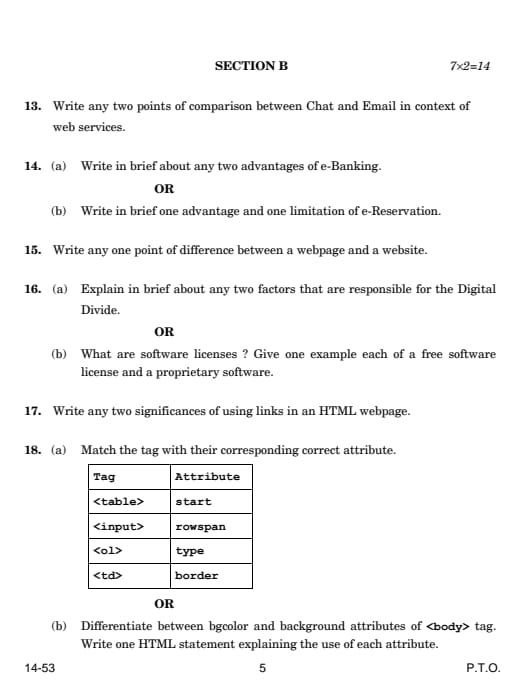
Section B:
Question 13:
Write any two points of comparison between Chat and Email in the context of web services.
- Speed: Chat is faster for instant communication, while emails are slower and not real-time.
- Formality: Chat is informal and used for casual conversations. Email is more formal and used for professional or official communication.
Read More
Chat is quick and informal; email is slower and more formal.
Question 14:
(a) Write in brief about any two advantages of e-Banking.
- Convenience: You can bank from anywhere using a smartphone or computer, without going to a physical bank.
- Time-saving: You can do things like transfer money, pay bills, or check your balance quickly at any time.
Read More
e-Banking is fast and convenient, while e-Reservation can be a problem for people without internet access.
(b) Write in brief one advantage and one limitation of e-Reservation.
- Advantage: You can book tickets or rooms easily from anywhere using the internet.
- Limitation: Not everyone has access to the internet or knows how to use these systems.
Question 15:
Write any one point of difference between a webpage and a website.
A webpage is a single page that you see on the internet, while a website is a collection of many such pages linked together.
Read More
A webpage is one page, but a website is many pages linked together!
Question 16:
(a) Explain in brief about any two factors that are responsible for the Digital Divide.
- Economic factors: People who can't afford a computer or internet connection face a digital divide.
- Geographical factors: People living in rural or remote areas often don't have good internet access.
(b) What are software licenses? Give one example each of a free software license and a proprietary software.
- Software licenses define how software can be used, shared, or modified.
- Free software license: GNU General Public License (GPL).
- Proprietary software: Microsoft Windows (where you cannot change the software).
Read More
Free software can be changed and shared; proprietary software cannot be modified or shared without permission.
Question 17:
Write any two significances of using links in an HTML webpage.
Read More
- Navigation: Links help people move from one page to another on a website.
- Improving SEO: Links help search engines understand how different pages are connected, improving search results.
Links are important for both navigation and making sure your webpage is found easily on search engines.
Question 18:
(a) Match the tag with their corresponding correct attribute.
Read More
| Tag | Attribute |
|---|---|
| <table> | border |
| <input> | type |
| <ol> | start |
| <td> | rowspan |
- <table> uses the border attribute to define the table's border.
- <input> uses the type attribute to define the input type (e.g., text, radio, checkbox).
- <ol> uses the start attribute to define the starting number for an ordered list.
- <td> uses the rowspan attribute to specify how many rows the table cell should span.
- border in <table> defines the table’s border.
- rowspan in <td> makes the table cell span multiple rows.
(b) Differentiate between bgcolor and background attributes of the <body> tag. Write one HTML statement explaining the use of each attribute.
- bgcolor: Specifies the background color for the webpage.
- background: Specifies an image to be used as the background of the webpage.
<body bgcolor="lightblue">
<body background="image.jpg">
- Use bgcolor for solid colors and background for images in the <body> tag.
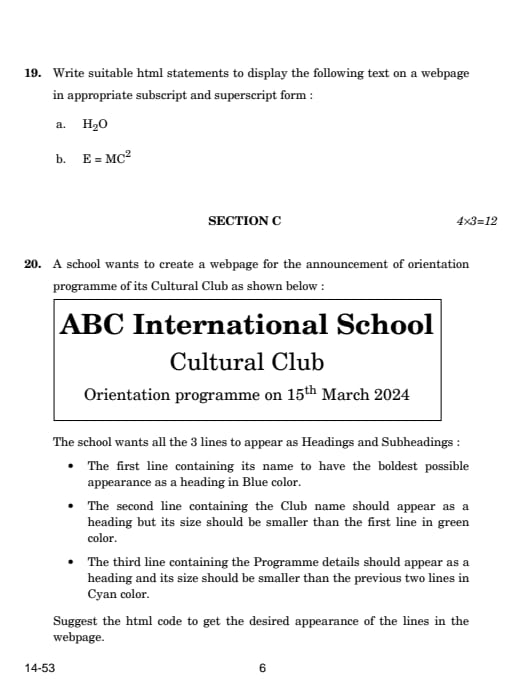
Question 19:
Write suitable HTML statements to display the following text on a webpage in appropriate subscript and superscript form:
Read More
- For subscript: H2O
- For superscript: E = MC2
H2O
E = MC2
- Use <sub> for subscript and <sup> for superscript in HTML!
Question 20:
A school wants to create a webpage for the announcement of the orientation programme of its Cultural Club. The school wants all the 3 lines to appear as Headings and Subheadings:
- The first line containing its name to have the boldest possible appearance as a heading in Blue color.
- The second line containing the Club name should appear as a heading but its size should be smaller than the first line in green color.
- The third line containing the Programme details should appear as a heading and its size should be smaller than the previous two lines in Cyan color.
Read More
<!DOCTYPE html>
<html>
<head>
    <title>Orientation Programme</title>
    <style>
        h1 {
            color: blue;
            font-weight: bold;
            font-size: 36px; /* Largest size for the heading */
        }
        h2 {
            color: green;
            font-size: 28px; /* Smaller than h1 */
        }
        h3 {
            color: cyan;
            font-size: 22px; /* Smaller than h2 */
        }
    </style>
</head>
<body>
    <h1>ABC International School</h1>
    <h2>Cultural Club</h2>
    <h3>Orientation programme on 15th March 2024</h3>
</body>
</html>
Solution:
The HTML code uses three heading tags (<h1>, <h2>, and <h3>) to define the headings for each line. CSS styles are applied to set the colors and sizes as follows:
- The <h1> tag is styled with a blue color, bold weight, and the largest font size.
- The <h2> tag is styled with a green color and a smaller font size than <h1>.
- The <h3> tag is styled with a cyan color and the smallest font size among the three.
Use CSS to style headings by changing their color, font-weight, and font-size. The heading tags (<h1> to <h6>) define the visual hierarchy of content on a webpage.
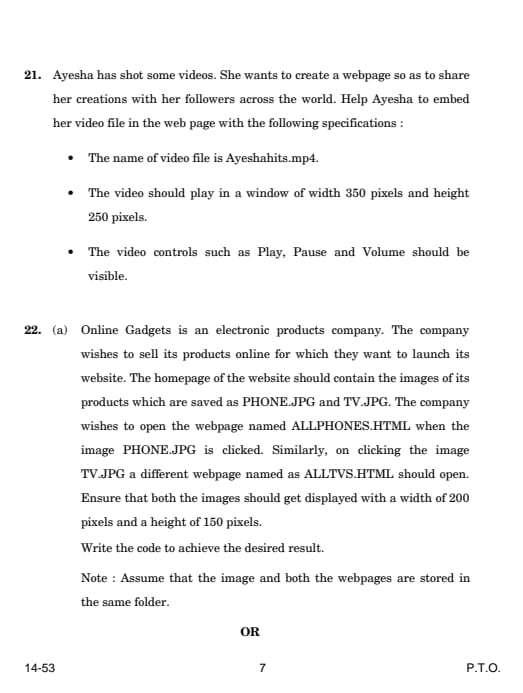
Question 21:
Ayesha has shot some videos. She wants to create a webpage so as to share her creations with her followers across the world. Help Ayesha to embed her video file in the webpage with the following specifications:
- The name of the video file is Ayeshahits.mp4.
- The video should play in a window of width 350 pixels and height 250 pixels.
- The video controls such as Play, Pause, and Volume should be visible.
Read More
<!DOCTYPE html>
<html>
<head>
    <title>Ayesha's Video</title>
</head>
<body>
    <h1>Ayesha's Video Creations</h1>
    <video width="350" height="250" controls>
        <source src="Ayeshahits.mp4" type="video/mp4">
        Your browser does not support the video tag.
    </video>
</body>
</html>
Solution:
The <video> tag is used to embed videos into the webpage. The attributes set the following:
- width="350" and height="250" set the dimensions of the video player.
- The controls attribute ensures that Play, Pause, and Volume buttons are visible.
- The <source> tag specifies the video file name (Ayeshahits.mp4) and type (video/mp4).
Use the <video> tag to embed videos, and always include controls for better user experience.
Question 22:
(a) Online Gadgets is an electronic products company. The company wishes to sell its products online for which they want to launch its website. The homepage of the website should contain the images of its products saved as PHONE.JPG and TV.JPG. The company wishes to open the webpage named ALLPHONES.HTML when the image PHONE.JPG is clicked. Similarly, on clicking the image TV.JPG, a different webpage named ALLTVS.HTML should open. Both images should be displayed with a width of 200 pixels and a height of 150 pixels.
Read More
<!DOCTYPE html>
<html>
<head>
    <title>Online Gadgets</title>
</head>
<body>
    <h1>Welcome to Online Gadgets!</h1>
    <p>Click on the images to explore more products.</p>

    <!-- Image for Phones -->
    <a href="ALLPHONES.HTML">
        <img src="PHONE.JPG" alt="Phone" width="200" height="150">
    </a>

    <!-- Image for TVs -->
    <a href="ALLTVS.HTML">
        <img src="TV.JPG" alt="TV" width="200" height="150">
    </a>
</body>
</html>
Solution:
The <a> tag is used to create clickable links, and the <img> tag is used to display images. Here's how they work together:
- <a href="ALLPHONES.HTML"> makes the PHONE.JPG image clickable, linking it to the ALLPHONES.HTML page.
- <a href="ALLTVS.HTML"> makes the TV.JPG image clickable, linking it to the ALLTVS.HTML page.
- width="200" and height="150" set the size of both images.
Use the <a> tag with an <img> tag inside to create clickable images that link to other webpages.
Question 23:
Explain the term “Plagiarism.” Write in brief any two examples to illustrate acts of Plagiarism.
Plagiarism is the act of using someone else’s work, ideas, or words without giving proper credit and presenting it as one’s own. It is considered unethical and a form of intellectual theft. Plagiarism can occur in various forms, such as copying text, images, or code without attribution, or paraphrasing content without acknowledging the source.
Examples of Plagiarism:Read More
- Copying Text Without Citation: A student copies paragraphs from an online article or a book and pastes it into their assignment without mentioning the source. This act is plagiarism because the original author is not credited for their work.
- Submitting Someone Else’s Work: A student submits a friend’s project, essay, or code as their own. Even if the friend has given permission, this act is plagiarism because the original creator is not acknowledged, and the work is falsely presented as the student’s own.
Plagiarism is a serious offense in academics, research, and professional settings. It not only disrespects the original creator’s effort but can also lead to penalties like failing grades, damaged reputation, or even legal consequences.
Always give proper credit to the original author by using citations and references. Tools like plagiarism checkers can help ensure your work is original and properly cited.
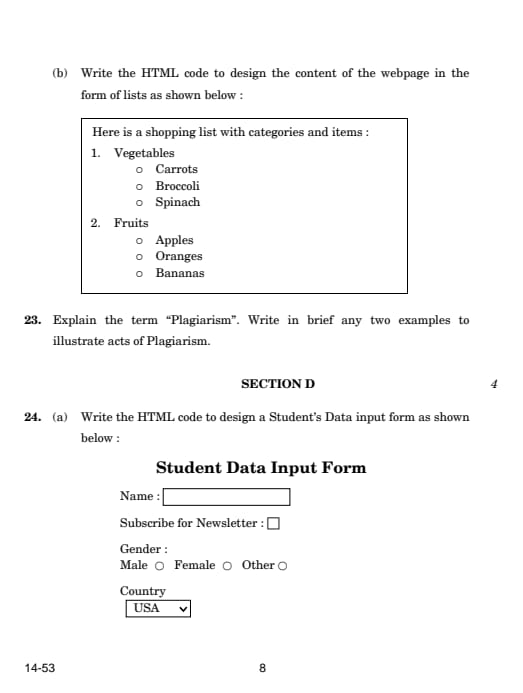
Question 24:
(a) Write the HTML code to design a Student’s Data input form as shown below.
Read More
<!DOCTYPE html>
<html>
<head>
    <title>Student Data Input Form</title>
</head>
<body>
    <h1>Student Data Input Form</h1>
    <form>
        <!-- Name Input -->
        <label for="name">Name:</label>
        <input type="text" id="name" name="name"><br><br>

        <!-- Newsletter Checkbox -->
        <label for="newsletter">Subscribe for Newsletter:</label>
        <input type="checkbox" id="newsletter" name="newsletter"><br><br>

        <!-- Gender Radio Buttons -->
        <label>Gender:</label><br>
        <input type="radio" id="male" name="gender" value="Male">
        <label for="male">Male</label><br>
        <input type="radio" id="female" name="gender" value="Female">
        <label for="female">Female</label><br>
        <input type="radio" id="other" name="gender" value="Other">
        <label for="other">Other</label><br><br>

        <!-- Country Dropdown -->
        <label for="country">Country:</label>
        <select id="country" name="country">
            <option value="USA">USA</option>
            <option value="Canada">Canada</option>
            <option value="UK">UK</option>
            <option value="Australia">Australia</option>
        </select><br><br>
    </form>
</body>
</html>
Solution:
The HTML code uses:
- The <input type="text"> element to create a textbox for the name.
- The <input type="checkbox"> element to create a checkbox for subscribing to the newsletter.
- The <input type="radio"> element grouped by the name attribute to create radio buttons for gender selection.
- The <select> element with <option> tags to create a dropdown list for country selection.
Use <label> tags with for attributes to link labels to form elements for better accessibility and usability.
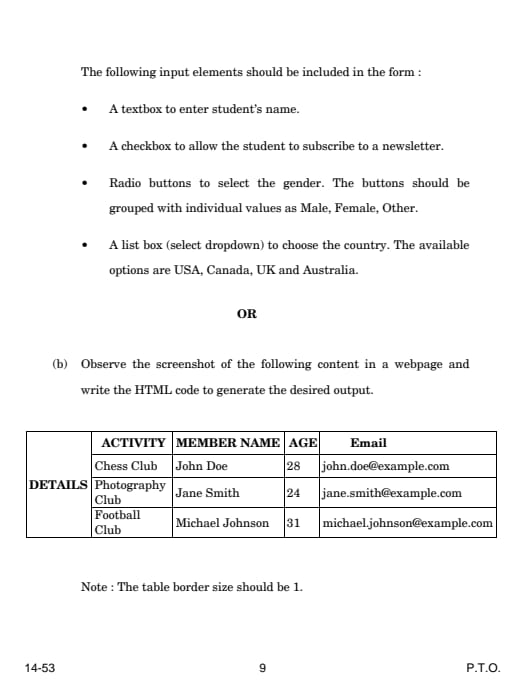
(b) Observe the screenshot of the following content in a webpage and write the HTML code to generate the desired output.
Read More
<!DOCTYPE html>
<html>
<head>
    <title>Details Table</title>
</head>
<body>
    <h2>DETAILS</h2>
    <table border="1">
        <tr>
            <th>ACTIVITY</th>
            <th>MEMBER NAME</th>
            <th>AGE</th>
            <th>Email</th>
        </tr>
        <tr>
            <td>Chess Club</td>
            <td>John Doe</td>
            <td>28</td>
            <td>john.doe@example.com</td>
        </tr>
        <tr>
            <td>Photography Club</td>
            <td>Jane Smith</td>
            <td>24</td>
            <td>jane.smith@example.com</td>
        </tr>
        <tr>
            <td>Football Club</td>
            <td>Michael Johnson</td>
            <td>31</td>
            <td>michael.johnson@example.com</td>
        </tr>
    </table>
</body>
</html>
Solution:
The HTML code uses the following:
- The <table> tag creates the table structure, and the border="1" attribute sets the border size to 1.
- The <tr> tag is used to create table rows.
- The <th> tag defines header cells for columns like Activity, Member Name, Age, and Email.
- The <td> tag defines data cells for individual rows and columns.
Use <th> for table headers to make them bold by default and align them center. Use border="1" in the <table> tag to quickly add a border to the table.
Question 25:
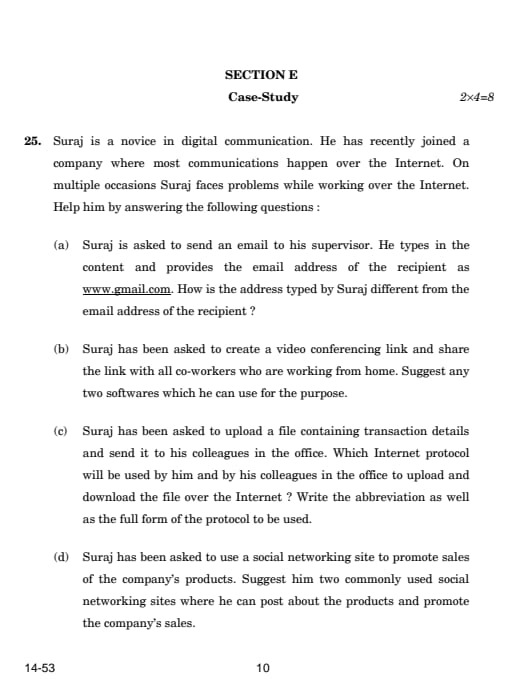
Suraj is a novice in digital communication. He has recently joined a company where most communications happen over the Internet. On multiple occasions, Suraj faces problems while working over the Internet. Help him by answering the following questions:
(a) Suraj is asked to send an email to his supervisor. He types in the content and provides the email address of the recipient as www.gmail.com. How is the address typed by Suraj different from the email address of the recipient?
Read More
The address www.gmail.com is a web address (URL) for accessing the Gmail website, not an email address. An email address typically contains a username followed by the domain, for example, supervisor@gmail.com.
Email addresses always have a format like username@domain.com.
(b) Suraj has been asked to create a video conferencing link and share the link with all co-workers who are working from home. Suggest any two softwares which he can use for the purpose.
- Zoom
- Google Meet
Read More
Many companies use video conferencing tools like Zoom and Google Meet for online meetings and collaboration.
(c) Suraj has been asked to upload a file containing transaction details and send it to his colleagues in the office. Which Internet protocol will be used by him and by his colleagues in the office to upload and download the file over the Internet? Write the abbreviation as well as the full form of the protocol to be used.
Read More
The protocol to be used is FTP (File Transfer Protocol).
Abbreviation: FTP
Full Form: File Transfer Protocol
FTP is commonly used to upload and download files securely over the Internet.
(d) Suraj has been asked to use a social networking site to promote sales of the company’s products. Suggest him two commonly used social networking sites where he can post about the products and promote the company’s sales.
Read More
Social networking sites like Facebook and Instagram are widely used for marketing and product promotion.
Question 26:
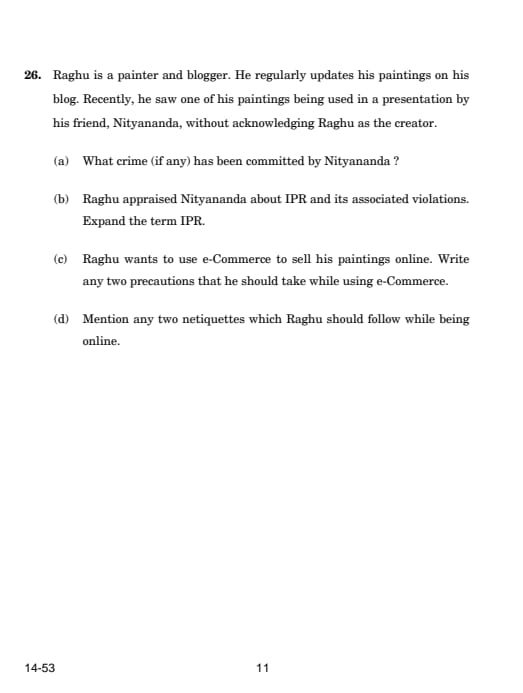
(a) Raghu is a painter and blogger. He regularly updates his paintings on his blog. Recently, he saw one of his paintings being used in a presentation by his friend, Nityananda, without acknowledging Raghu as the creator. What crime (if any) has been committed by Nityananda?
Nityananda has committed the act of Plagiarism. Plagiarism occurs when someone uses another person’s work, such as paintings, writings, or music, without giving proper credit to the original creator. This is unethical and a violation of intellectual property rights.
Solution: Using someone else's work without acknowledgment disrespects their intellectual property. It is considered a serious offense in academic, artistic, and professional contexts.
Read More
Always give credit to the original creator of a work, whether it's art, writing, or music, to avoid plagiarism.
(b) Raghu appraised Nityananda about IPR and its associated violations. Expand the term IPR.
IPR: Intellectual Property Rights
Solution: IPR refers to the legal rights granted to the creators of intellectual property, such as paintings, writings, inventions, and designs, to protect their work from unauthorized use or reproduction.
Read More
Intellectual Property Rights ensure that creators have control over the use of their work and can benefit from their creations.
(c) Raghu wants to use e-Commerce to sell his paintings online. Write any two precautions that he should take while using e-Commerce.
- Ensure the e-Commerce website is secure (look for
https://in the URL). - Use secure payment methods, such as credit cards or trusted payment gateways like PayPal.
Solution: Selling products online through e-Commerce platforms requires precautions to ensure safety and avoid fraud. Verifying the credibility of the platform and using secure payment methods reduces risks.
Read More
Always check for https:// in the URL and use trusted payment methods to ensure secure transactions online.
(d) Mention any two netiquettes which Raghu should follow while being online.
Read More
- Be respectful and polite in all online communications.
- Avoid sharing false or misleading information on the internet.
Solution: Netiquettes refer to the correct or acceptable ways of behaving online. Respectful communication and avoiding the spread of misinformation contribute to a positive and ethical online environment.
Follow netiquettes like being polite and avoiding false information to ensure responsible and respectful online behavior.
*The article might have information for the previous academic years, please refer the official website of the exam.