
UP Board Class 12 Computer Science 2026 Question Paper with Solution PDF


| Updated On - Feb 22, 2026
UP Board is conducting the Class 12 Computer Science Board Exam 2026 on February 21, 2026. Class 12 Computer Science Question Paper with Solution PDF is available here for download.
The official question paper of UP Board Class 12 Computer Science Board Exam 2026 is provided below. Students can download the official paper in PDF format for reference.
UP Board Class 12 2026 Computer Science Question Paper with Solution PDF
| UP Board Class 12 Computer Science Question Paper 2026 | Download PDF | Check Solutions |

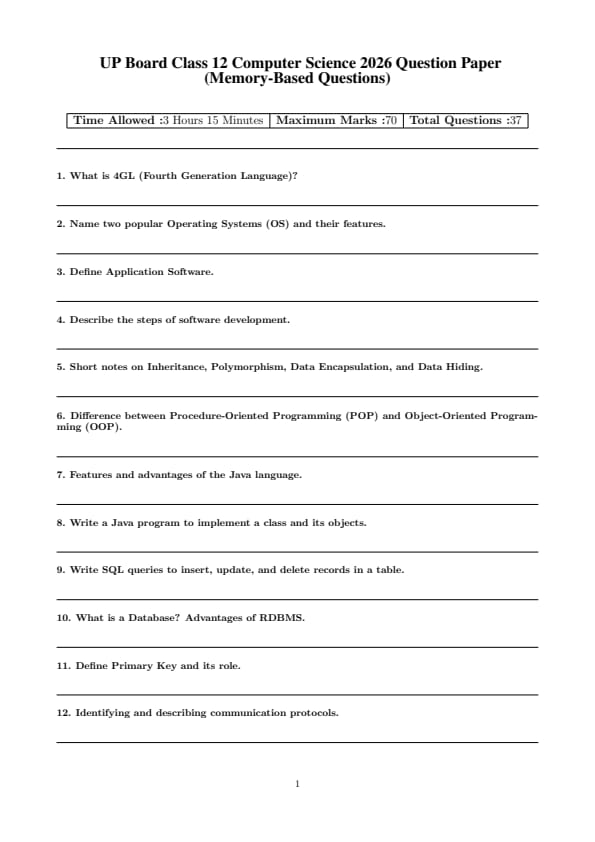
What is 4GL (Fourth Generation Language)?
View Solution
Step 1: Understanding the Concept:
A Fourth Generation Language (4GL) is a high-level computer programming language that is designed to be closer to human language than 3GLs (like C or Java). It is primarily used to reduce the time, effort, and cost of software development.
Step 2: Key Formula or Approach:
4GLs are often "non-procedural," meaning the programmer specifies *what* the result should be, rather than *how* to achieve it step-by-step. Common examples include SQL (for databases) and MATLAB (for data analysis).
Step 3: Detailed Explanation:
Key characteristics of 4GL include:
High Productivity: Allows developers to create applications with fewer lines of code.
User-Friendly: Uses English-like commands (e.g., SELECT, FROM, WHERE).
Database Access: Most 4GLs are integrated with database management systems.
Problem-Oriented: Focused on solving specific business or data problems rather than general hardware tasks.
Step 4: Final Answer:
4GL is a non-procedural, high-level language designed to simplify programming and speed up application development by using human-like syntax. Quick Tip: Remember the evolution: 1GL (Machine), 2GL (Assembly), 3GL (Procedural/C++), 4GL (SQL/Non-procedural).
Name two popular Operating Systems (OS) and their features.
View Solution
Step 1: Understanding the Concept:
An Operating System (OS) is system software that manages computer hardware, software resources, and provides common services for computer programs.
Step 2: Detailed Explanation:
Two popular Operating Systems are:
Microsoft Windows:
User Interface: Features a highly intuitive Graphical User Interface (GUI).
Compatibility: Supports a vast range of hardware and software (especially gaming and business tools).
Multi-tasking: Efficiently handles multiple applications simultaneously.
Linux:
Open Source: The source code is freely available for anyone to modify.
Security: Known for being highly secure and stable against viruses.
Customization: Offers various "distributions" (distros) like Ubuntu or Fedora to suit specific user needs.
Step 3: Final Answer:
Windows is preferred for its ease of use and compatibility, while Linux is favored for its security and open-source nature. Quick Tip: The kernel is the most important part of an OS, acting as the bridge between software and hardware.
Define Application Software.
View Solution
Step 1: Understanding the Concept:
Application Software (or "app") is a type of computer program that performs a specific personal, educational, or business function.
Step 2: Detailed Explanation:
Unlike system software (which runs the computer), application software is designed for the end-user.
General Purpose: Tools like Word Processors (MS Word) or Spreadsheets (MS Excel).
Special Purpose: Software designed for specific tasks like accounting (Tally) or graphic design (Photoshop).
Web-based: Apps that run in a browser like Gmail.
Step 3: Final Answer:
Application software is end-user software used to accomplish specific tasks, ranging from document creation to photo editing. Quick Tip: Think of it this way: System software is for the computer; Application software is for you.
Describe the steps of software development.
View Solution
Step 1: Understanding the Concept:
The Software Development Life Cycle (SDLC) is a structured process used by the software industry to design, develop, and test high-quality software.
Step 2: Detailed Explanation:
The standard steps include:
Requirement Analysis: Gathering information from stakeholders to define what the software must do.
System Design: Creating the architecture, user interface, and data models.
Coding (Implementation): Translating designs into a programming language.
Testing: Checking for bugs and ensuring the software meets the requirements.
Deployment: Releasing the software to the users or production environment.
Maintenance: Updating the software to fix new issues or add features over time.
Step 3: Final Answer:
Software development involves a cycle of planning, designing, coding, testing, and maintaining to ensure the final product is functional and reliable. Quick Tip: The 'Waterfall' model and 'Agile' are the two most common methodologies used to manage these steps.
Short notes on Inheritance, Polymorphism, Data Encapsulation, and Data Hiding.
View Solution
Step 1: Understanding the Concept:
These are the core pillars of Object-Oriented Programming (OOP) that help in building modular and reusable code.
Step 2: Detailed Explanation:
Inheritance: The mechanism by which one class (child) acquires the properties and behaviors of another class (parent). It promotes code reusability.
Polymorphism: The ability of a single function or operator to take multiple forms. For example, a "Draw" function might behave differently for a circle than for a square.
Data Encapsulation: The process of wrapping data (variables) and code (methods) together as a single unit (a class).
Data Hiding: A technique of isolating data members from direct access by external code, usually achieved by making variables 'private' to ensure security and prevent accidental changes.
Step 3: Final Answer:
Inheritance enables reuse, Polymorphism allows flexibility, Encapsulation bundles data, and Data Hiding protects data within OOP. Quick Tip: Encapsulation is the "container" (the class), while Data Hiding is the "security guard" (access modifiers like private/protected).
Difference between Procedure-Oriented Programming (POP) and Object-Oriented Programming (OOP).
View Solution
Step 1: Understanding the Concept:
POP and OOP are two different programming paradigms used to solve problems in computer science.
Step 2: Detailed Explanation:
\begin{table[h!]
\centering
\begin{tabular{|l|l|l|
\hline
Feature & POP (e.g., C, Pascal) & OOP (e.g., Java, C++)
\hline
Approach & Top-down approach. & Bottom-up approach.
\hline
Unit & Focuses on functions/procedures. & Focuses on objects/classes.
\hline
Data Security & Data is less secure (moves freely). & Highly secure (Data Hiding).
\hline
Reusability & Limited reusability. & High reusability via Inheritance.
\hline
Access Control & No access specifiers. & Has private, public, protected.
\hline
\end{tabular
\end{table
Step 3: Final Answer:
POP is task-centered and linear, whereas OOP is data-centered and modular, making it more suitable for large, complex software systems. Quick Tip: Most modern industrial applications use OOP because it is much easier to maintain and scale than POP.
Features and advantages of the Java language.
View Solution
Step 1: Understanding the Concept:
Java is a high-level, class-based, object-oriented programming language designed to have as few implementation dependencies as possible. Its slogan is "Write Once, Run Anywhere" (WORA).
Step 2: Detailed Explanation:
Features of Java:
Platform Independent: Compiled Java code (bytecode) runs on any device equipped with a Java Virtual Machine (JVM).
Object-Oriented: Everything in Java is an Object, which helps in organizing complex code.
Robust: It has strong memory management and exception handling.
Secure: It runs inside a "sandbox" (JVM), preventing unauthorized access to system resources.
Advantages:
Reusability: Through inheritance, code can be reused, saving time.
Multithreading: Java can perform multiple tasks at once, improving performance for complex apps.
Large Community: Extensive libraries and support are available for developers.
Step 3: Final Answer:
Java's primary strength lies in its platform independence and secure, object-oriented structure, making it ideal for enterprise-level applications. Quick Tip: Java doesn't support "Pointers" like C++, which is one of the main reasons why it is considered more secure and less prone to memory errors.
Write a Java program to implement a class and its objects.
View Solution
Step 1: Understanding the Concept:
In Java, a Class is a blueprint or template, and an Object is an instance of that class that has state and behavior.
Step 2: Key Formula or Approach:
To implement this, we define a class with attributes (variables) and methods, then use the \texttt{new keyword in the \texttt{main method to create objects.
Step 3: Detailed Explanation:
Here is a simple program representing a "Student":
\begin{verbatim
class Student {
String name;
int rollNo;
// Method to display details
void display() {
System.out.println("Name: " + name + ", Roll No: " + rollNo);
public class Main {
public static void main(String[] args) {
// Creating an Object
Student s1 = new Student();
// Initializing attributes
s1.name = "Aryan";
s1.rollNo = 101;
// Calling method
s1.display();
\end{verbatim
Step 4: Final Answer:
The program defines a \texttt{Student class and creates an object \texttt{s1 to store and display student information. Quick Tip: A class name should always start with an Uppercase letter (PascalCase), while method and variable names should start with a lowercase letter (camelCase).
Write SQL queries to insert, update, and delete records in a table.
View Solution
Step 1: Understanding the Concept:
SQL (Structured Query Language) uses Data Manipulation Language (DML) commands to manage data within a table.
Step 2: Detailed Explanation:
Let's assume we have a table named \texttt{Employees.
INSERT: To add a new record.
\begin{verbatim
INSERT INTO Employees (ID, Name, Salary)
VALUES (1, 'Rahul', 50000);
\end{verbatim
UPDATE: To modify existing data.
\begin{verbatim
UPDATE Employees
SET Salary = 55000
WHERE ID = 1;
\end{verbatim
DELETE: To remove a record.
\begin{verbatim
DELETE FROM Employees
WHERE ID = 1;
\end{verbatim
Step 3: Final Answer:
Use \texttt{INSERT for adding, \texttt{UPDATE for changing, and \texttt{DELETE for removing records, always using the \texttt{WHERE clause for updates and deletes to avoid affecting the whole table. Quick Tip: Always double-check your \texttt{WHERE} clause! If you forget it during an \texttt{UPDATE} or \texttt{DELETE}, you will change or erase every single row in the table.
What is a Database? Advantages of RDBMS.
View Solution
Step 1: Understanding the Concept:
A Database is an organized collection of structured information, or data, typically stored electronically in a computer system. An RDBMS (Relational Database Management System) stores data in tables linked by common keys.
Step 2: Detailed Explanation:
Advantages of RDBMS:
Data Integrity: Ensures that data is accurate and consistent through constraints.
Reduced Redundancy: Through normalization, data duplication is minimized.
Security: Allows administrators to set permissions on who can see or edit specific data.
Scalability: Can handle large amounts of data and many simultaneous users.
Step 3: Final Answer:
RDBMS is the standard for modern data storage because it organizes data into related tables, ensuring efficiency and accuracy. Quick Tip: Examples of popular RDBMS include MySQL, PostgreSQL, Oracle, and Microsoft SQL Server.
Define Primary Key and its role.
View Solution
Step 1: Understanding the Concept:
A Primary Key is a specific column (or set of columns) in a table that uniquely identifies each row in that table.
Step 2: Detailed Explanation:
Roles of a Primary Key:
Uniqueness: It ensures that no two rows have the same ID.
Non-null: A Primary Key cannot contain NULL values; every record must have an identity.
Relationships: It is used as a "Foreign Key" in other tables to create links between data.
Step 3: Final Answer:
The role of a Primary Key is to act as a unique identifier for records and to maintain the relational integrity of the database. Quick Tip: A table can have only \textbf{one} Primary Key, but that key can consist of multiple columns (called a Composite Key).
Identifying and describing communication protocols.
View Solution
Step 1: Understanding the Concept:
A communication protocol is a set of rules that allows two or more entities of a communications system to transmit information.
Step 2: Detailed Explanation:
Commonly used protocols include:
HTTP/HTTPS: Used for transferring web pages over the internet. HTTPS is the secure version.
TCP/IP: The fundamental suite of protocols for the Internet. TCP ensures reliable delivery, while IP handles routing.
FTP: Used for transferring files between a client and a server.
SMTP: Used specifically for sending emails.
Step 3: Final Answer:
Protocols like HTTP, TCP/IP, and SMTP act as the "language" of the internet, ensuring that different devices can understand and exchange data correctly. Quick Tip: Remember: HTTP uses Port 80, while HTTPS (the secure one) uses Port 443.
UP Board Class 12 Computer Science Important Topics
*The article might have information for the previous academic years, please refer the official website of the exam.