
CUET 2026 Computer Science Question Paper May 21 Shift 1 with Solution PDF


| Updated On - May 27, 2026
CUET 2026 May 21 Shift 1 Computer Science Question Paper with Solution PDF is available here for download. NTA conducted CUET 2026 on May 21, Shift 1, from 2 PM to 5 PM in CBT Mode.
The CUET 2026 Computer Science Question Paper includes questions from Python, Data Structures, Computer Networks and Database Management, with 50 Questions carrying a total of 250 marks. As per the CUET marking scheme, +5 marks are awarded for every correct answer, and -1 mark is deducted for every wrong answer.
CUET 2026 Computer Science Question Paper May 21 Shift 1 with Solution PDF
| CUET 2026 Computer Science Question Paper | Download PDF | Check Solutions |
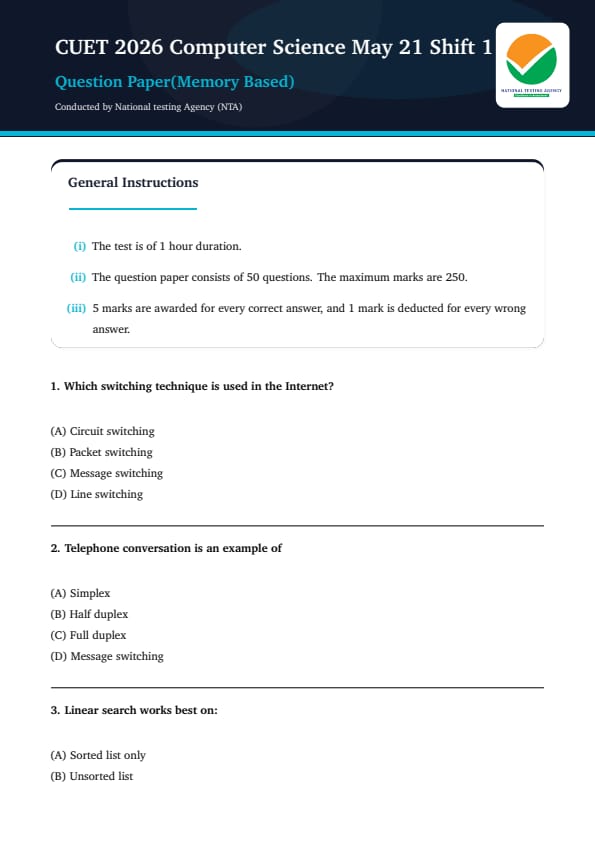
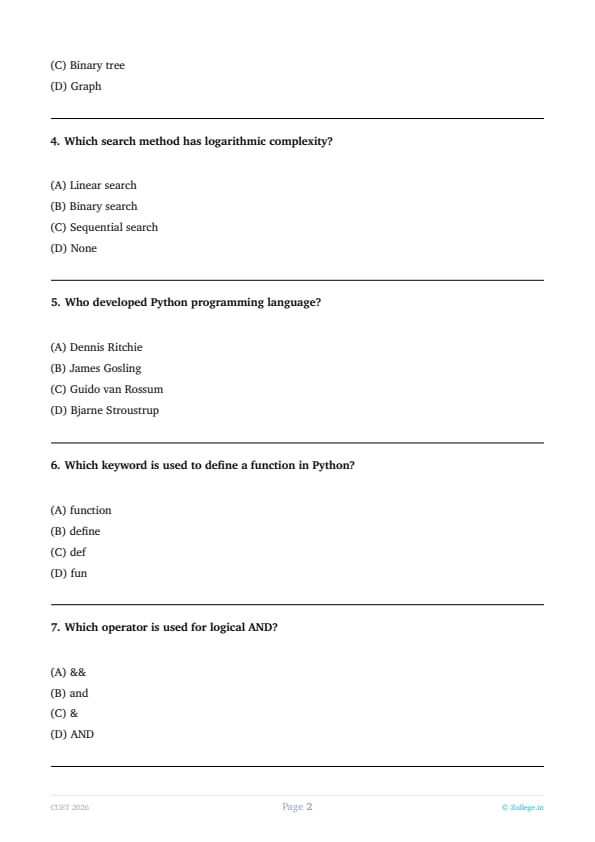
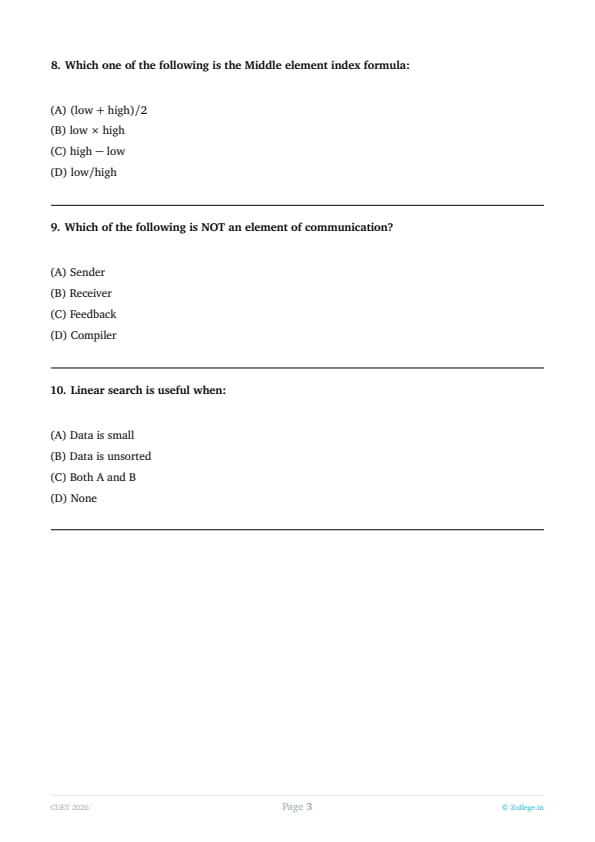
Which switching technique is used in the Internet?
View Solution
Step 1: Understanding the Concept:
The fundamental design of the Internet relies on how data is moved from a source to a destination across a vast network of interconnected devices.
Network switching techniques determine how paths are established and how data is formatted for travel.
The goal of the Internet's architecture is to ensure that data transmission is efficient, resilient to hardware failures, and capable of handling multiple users on the same physical link.
Step 2: Detailed Explanation:
The Internet operates primarily on the TCP/IP protocol suite, which is built upon the foundation of packet switching.
In a packet-switched network, the original data—whether it is a simple text file, a high-definition video, or a complex software update—is not sent in one continuous stream.
Instead, the source device breaks the data into smaller, manageable units called packets.
Each packet is a discrete bundle of information consisting of the payload (the actual part of the user's data) and a header.
The header contains critical routing information, including the source IP address, the destination IP address, a sequence number, and error-detection codes.
Unlike the older circuit-switching technology used in traditional telephone networks, packet switching does not require the creation of a dedicated, exclusive physical path between the sender and the receiver before data can be sent.
Because each packet contains its own destination information, it can be routed independently through the network.
Routers along the path use complex routing tables and algorithms to determine the best next-hop for each individual packet based on current network congestion and link availability.
This means that two packets from the same original message might take completely different geographical routes to reach the same destination.
This decentralized nature makes the Internet incredibly robust; if one specific router or link goes down, the network simply routes the remaining packets through an alternative path.
Once all the packets arrive at the destination, the receiving device uses the sequence numbers stored in the headers to reassemble them into the original, correct order.
This method is highly efficient because it allows many different users to "multiplex" or share the same communication channels simultaneously, maximizing the utilization of total available bandwidth.
If a packet is lost or corrupted during its journey, only that specific small packet needs to be retransmitted rather than the entire large file, which significantly saves time and resources.
Step 3: Final Answer:
Therefore, packet switching is the core switching technique utilized in the Internet, making option (B) the correct answer.
Quick Tip: Remember that the Internet is like a post office system where letters (packets) are sent individually and can take different routes. This is the opposite of a private telephone line (Circuit Switching) where a dedicated path is reserved just for your call.
Telephone conversation is an example of
View Solution
Step 1: Understanding the Concept:
Transmission mode, also known as communication mode, refers to the direction of signal flow between two linked devices.
It defines whether the communication is one-way, two-way but sequential, or two-way and simultaneous.
Choosing the correct mode depends on the requirements of the interaction, such as the need for immediate feedback or high-speed data transfer.
Step 2: Detailed Explanation:
In the field of data communication, there are three primary modes of transmission:
1. Simplex Mode: This is a strictly unidirectional mode of communication.
In simplex mode, one device acts as a permanent transmitter and the other as a permanent receiver.
The receiver has no way to send a signal back.
A classic example is a television broadcast or a computer sending data to a monitor; the screen only displays what it receives and does not talk back to the graphics card.
2. Half-Duplex Mode: This mode allows for bidirectional communication, but not at the same time.
Both parties can send and receive data, but the channel is only available for one direction at a single moment.
While one party is transmitting, the other must wait and listen.
Walkie-talkies are the most common example of half-duplex communication, where users say "over" to indicate they have stopped speaking and are switching to listening mode.
3. Full-Duplex Mode: This is the most advanced and efficient mode for human interaction.
It allows for bidirectional and simultaneous communication.
In full-duplex mode, both parties can send and receive information at the exact same time without any interruption or waiting period.
A standard telephone conversation is the classic example of full-duplex communication.
When you are on a call, you can speak and hear the other person's voice simultaneously.
Technically, this is achieved by splitting the communication medium into two separate transmission paths or frequency bands—one for outgoing data and one for incoming data.
This capability allows for a natural, fluid conversation where speakers can interrupt or provide vocal acknowledgments (like "mm-hmm") while the other is still talking.
Option (D) Message Switching is not a transmission mode but a network routing technique where an entire message is forwarded from node to node.
Step 3: Final Answer:
Hence, a telephone conversation is an example of full-duplex transmission, corresponding to option (C).
Quick Tip: Think of it this way:
Simplex = One-way street
Half-Duplex = Single-lane bridge (cars go both ways but one at a time)
Full-Duplex = Two-lane highway (cars move in both directions at once)
Linear search works best on:
View Solution
Step 1: Understanding the Concept:
Search algorithms are mathematical procedures used to find the location of a specific data element within a collection.
The choice of an algorithm depends largely on the "state" or organization of the data set.
Linear search, also called sequential search, is the simplest algorithm and involves checking every element one by one.
Step 2: Detailed Explanation:
Linear search operates by starting at the beginning of a list and comparing the target value with each element sequentially.
If a match is found, the index of that element is returned; if the end of the list is reached without a match, the algorithm reports that the value is not present.
Let's evaluate the different data states provided:
In a Sorted List (Option A), data is arranged in a specific order (ascending or descending).
Because of this order, we can use highly efficient algorithms like Binary Search, which has a time complexity of \( O(\log n) \).
In a sorted list, linear search is considered inefficient because it doesn't take advantage of the existing order to skip elements.
However, when a list is Unsorted (Option B), there is no inherent structure or pattern that we can exploit.
In an unsorted array, we have no way of knowing if the target element is at the beginning, the middle, or the end.
Because we cannot skip any items without the risk of missing the target, a sequential scan (linear search) is the only straightforward and direct method available.
While the worst-case complexity for linear search is always \( O(n) \), it is "best suited" for unsorted lists or small datasets.
For small datasets, the overhead of sorting a list just to perform a binary search is often more computationally expensive than simply performing a linear search.
Binary Trees (Option C) and Graphs (Option D) are non-linear data structures that require specialized traversal algorithms like Depth First Search (DFS) or Breadth First Search (BFS).
Linear search is strictly a linear data structure algorithm (used on arrays or linked lists).
Step 3: Final Answer:
Therefore, linear search is the most appropriate and best-suited method for an unsorted list, which corresponds to option (B).
Quick Tip: Always use Linear Search if the list is unsorted or very small. If the list is already sorted and large, always prefer Binary Search to save time.
Which search method has logarithmic complexity?
View Solution
Step 1: Understanding the Concept:
Time complexity is a way to describe how the execution time of an algorithm changes as the size of the input data (\( n \)) increases.
Logarithmic complexity, written as \( O(\log n) \), is one of the most efficient growth rates in computer science because the number of operations grows very slowly even as the dataset becomes massive.
Key Formula or Approach:
Algorithms with logarithmic complexity usually follow a "divide and conquer" strategy.
If an algorithm can reduce the problem size by half in every step, it will result in logarithmic behavior.
Step 2: Detailed Explanation:
Let us analyze the options based on their mathematical behavior:
Linear Search and Sequential Search (Options A and C) are actually different names for the same process.
These algorithms check every item in a list from start to finish.
If there are 1,000 elements, it might take 1,000 checks. If there are 1,000,000 elements, it might take 1,000,000 checks.
This direct proportionality means they have a Linear Time Complexity of \( O(n) \).
Binary Search (Option B), however, requires a sorted dataset to function.
It starts by looking at the exact middle of the list.
If the target value is lower than the middle value, the algorithm completely ignores the right half of the list.
If the target is higher, it ignores the left half.
By halving the search space in every single iteration, the number of steps required to find an element is much smaller than the total number of elements.
Mathematically, the number of times you can divide \( n \) by 2 before reaching 1 is represented as \( \log_2 n \).
For a dataset of 1,024 items, a linear search would take up to 1,024 steps, while a binary search would take only \( \log_2(1024) = 10 \) steps.
This makes binary search incredibly powerful for searching through huge databases, search engine indexes, or large file systems.
The reduction is modeled by the recurrence relation \( T(n) = T(n/2) + c \).
Step 3: Final Answer:
Therefore, binary search is the algorithm that possesses a logarithmic complexity of \( O(\log n) \), which matches option (B).
Quick Tip: Any algorithm that "cuts the work in half" at every step is a candidate for logarithmic complexity (\( O(\log n) \)). This is why Binary Search is so much faster than Linear Search for large datasets!
Who developed Python programming language?
View Solution
Step 1: Understanding the Concept:
This question pertains to the historical development of modern computing tools.
Identifying the creators of major programming languages is a fundamental aspect of computer science literacy, especially for competitive exams like CUET.
Step 2: Detailed Explanation:
Python is a high-level, interpreted programming language that is now famous for its readability and versatility in AI, data science, and web development.
It was originally conceived and developed by the Dutch computer scientist Guido van Rossum in the late 1980s.
At the time, Van Rossum was working at the Centrum Wiskunde & Informatica (CWI) in the Netherlands.
He designed Python as a successor to the ABC language, which was intended for teaching but had limited capabilities.
The language was officially released to the public in February 1991.
One interesting fact is that the name "Python" does not come from the snake; rather, it was named after the BBC comedy series "Monty Python's Flying Circus," of which Van Rossum was a fan.
To further clarify, let's look at the other names in the options:
Dennis Ritchie (Option A) is widely credited with creating the C programming language at Bell Labs in the early 1970s. He also co-created the UNIX operating system.
James Gosling (Option B) is famously known as the "father of Java." He developed Java while working at Sun Microsystems in the mid-1990s.
Bjarne Stroustrup (Option D) is the Danish computer scientist who designed and developed the C++ programming language as an extension of the original C language to include object-oriented features.
Guido van Rossum managed the development of Python for nearly 30 years as its "Benevolent Dictator for Life" (BDFL) until he stepped down from the role in 2018.
Step 3: Final Answer:
Based on the historical record of programming language development, Guido van Rossum is the creator of Python, making option (C) the correct choice.
Quick Tip: To remember the big four:
Dennis Ritchie \(\rightarrow\) C
Bjarne Stroustrup \(\rightarrow\) C++
James Gosling \(\rightarrow\) Java
Guido van Rossum \(\rightarrow\) Python
Which keyword is used to define a function in Python?
View Solution
Step 1: Understanding the Concept:
In computer programming, a function is a block of organized, reusable code that is used to perform a single, related action.
To create a function, a language requires a specific "reserved word" or keyword that tells the interpreter or compiler that a new block of code is being defined.
Step 2: Detailed Explanation:
Python is known for its concise and "human-readable" syntax.
In Python, functions are defined using the reserved keyword def.
The keyword \texttt{def stands for "define".
The general syntax of a function definition in Python is as follows:
\[ def function\_name(parameters): \]
This line is followed by an indented block of code which constitutes the function's body.
Let's evaluate the alternative options provided in the question:
Option (A) function: This keyword is used in languages like JavaScript, PHP, and Swift to declare functions, but it is not a valid keyword in Python.
Option (B) define: While "def" is short for "define," the full word is not a reserved keyword in Python. However, "define" is often used in C/C++ preprocessors (as \#define).
Option (D) fun: This keyword is used in modern functional languages like Kotlin or Rust (which uses \texttt{fn), but it is incorrect in the context of Python.
Python's design philosophy (the Zen of Python) emphasizes having "only one obvious way to do something."
Therefore, \texttt{def is the only keyword used for standard function definitions.
It is also important to remember that Python function definitions must always end with a colon (:) and the following code must be consistently indented.
Step 3: Final Answer:
Therefore, the correct keyword to define a function in Python is \texttt{def, which corresponds to option (C).
Quick Tip: In Python, always remember: {def} is for defining a function. Don't confuse it with {function} (JavaScript) or {fun} (Kotlin). Also, never forget the colon (:) at the end of the def line!
Which operator is used for logical AND?
View Solution
Step 1: Understanding the Concept:
Logical operators are used to combine multiple boolean conditions and return a single boolean result (True or False).
The "AND" operation specifically requires both conditions to be True for the entire statement to be True.
Step 2: Detailed Explanation:
Programming languages typically use specific symbols or keywords for logic.
In the majority of widely used, standard programming languages such as C, C++, Java, JavaScript, and C\#, the double ampersand && is the conventional symbol for the logical AND operation.
A logical AND operation evaluates to True if and only if both of its operands are True; otherwise, it evaluates to False.
Let's look at why the other symbols are different:
Option (C) &: A single ampersand represents a bitwise AND operator.
Bitwise operators perform logic on the individual binary digits (bits) of numbers, which is very different from logical truth-testing.
Option (B) and: In languages like Python, the word "and" is used for logical operations to make the code read more like English.
However, in standard computer science theory and the vast majority of "C-family" languages, && is the primary symbolic representation taught in curriculum.
Option (D) AND: Using all capitals is common in SQL databases or older languages like Pascal, but not in modern mainstream programming symbols.
Looking at the choices, both && and and represent logical AND in different environments.
However, in the context of general programming competitive exams (unless specified as Python), && is the classical symbolic operator used to represent the logical AND across C-style syntax languages.
Step 3: Final Answer:
Thus, the operator classically used for logical AND in most standard programming languages is &&, matching option (A).
Quick Tip: Always distinguish between single and double symbols:
&& is Logical AND (checks Truth/False).
& is Bitwise AND (works on binary bits).
Similarly, \(||\) is Logical OR, while \(|\) is Bitwise OR.
Which one of the following is the Middle element index formula:
View Solution
Step 1: Understanding the Concept:
In algorithms that work by repeatedly dividing a search space (such as Binary Search), we need a mathematical way to find the center point of a range.
This range is defined by two boundaries: a \texttt{low index and a \texttt{high index.
Key Formula or Approach:
The midpoint of any two values is their arithmetic mean.
If you have a starting point \( a \) and an ending point \( b \), the point exactly in the middle is:
\[ Midpoint = \frac{a + b}{2} \]
Step 2: Detailed Explanation:
When searching an array, we represent the current search interval using the indices \texttt{low and \texttt{high.
To find the exact midpoint to divide the search space, we calculate the arithmetic mean of the two boundaries.
This is represented as:
\[ mid = \frac{low + high}{2} \]
In integer arithmetic (common in programming), this division is typically truncated or floor-divided to produce a whole-number index.
For example, if \texttt{low is 0 and \texttt{high is 9, the formula gives \((0 + 9) / 2 = 4.5\), which truncates to index 4.
Let's analyze why the other options are incorrect:
Option (B) low \(\times\) high: Multiplication yields a value that would almost always fall outside the bounds of the array.
Option (C) high - low: This computes the "range size" or the number of elements in the interval, not the position of the middle element itself.
Option (D) low / high: This computes a ratio, which would typically result in 0 or a decimal less than 1, and does not represent a valid index.
A note on advanced implementation: In some programming languages, if \texttt{low and \texttt{high are very large integers, adding them might exceed the maximum capacity of a 32-bit integer (overflow).
To avoid this, experts sometimes write the formula as: \texttt{low + (high - low) / 2.
However, the basic mathematical expression for the middle element index is still \( (low + high) / 2 \).
Step 3: Final Answer:
Hence, the standard formula to find the middle element index is \( (low + high) / 2 \), which corresponds to option (A).
Quick Tip: Midpoint = Average. To find the middle of any two numbers, just add them and divide by 2. If you are coding in Java or C++ with very large arrays, use \texttt{low + (high-low)/2} to prevent overflow errors!
Which of the following is NOT an element of communication?
View Solution
Step 1: Understanding the Concept:
Communication is the process of exchanging information between two or more entities.
A standard communication model consists of specific components that work together to ensure a message is successfully created, transmitted, received, and understood.
Step 2: Detailed Explanation:
In both human and computer communication systems, the following elements are considered essential:
1. Sender (Option A): Also known as the source, this is the entity that creates and encodes the message to be sent.
2. Receiver (Option B): The target entity that receives the transmission and decodes the message.
3. Feedback (Option C): This is the response returned by the receiver to the sender. It confirms whether the message was received and if it was interpreted correctly. Feedback is vital for effective communication.
4. Other Elements: These include the Message itself, the Medium or Channel (the physical path like wire or air), and Noise (interference).
Let's evaluate Option (D) Compiler:
A compiler is a specialized computer program that translates source code (written in a high-level language) into machine code (low-level instructions).
While a compiler is a crucial tool in software development and computer science, it is not a part of the fundamental "communication cycle."
The compiler's job is translation, not transmission.
One does not need a compiler to communicate data over the internet or to have a conversation.
The compiler exists in the development phase, whereas the communication elements exist in the transmission phase.
Therefore, it does not belong in the list of basic communication components.
Step 3: Final Answer:
Thus, Compiler is NOT an element of communication, which aligns with option (D).
Quick Tip: To remember the elements of communication, visualize a person (Sender) sending a letter (Message) via a mailman (Channel) to a friend (Receiver) who then writes back (Feedback). A Compiler is just a software tool, not a part of this natural cycle.
Linear search is useful when:
View Solution
Step 1: Understanding the Concept:
In algorithm selection, efficiency is not always about having the lowest mathematical time complexity (\( O \)).
Sometimes, the simplest algorithm is the most practical choice depending on the specific state and size of the input data.
Step 2: Detailed Explanation:
Linear search works by inspecting every element of a list sequentially. Let's analyze why both scenarios provided are correct:
1. Small Data (Option A):
For a very small list (e.g., 5 to 10 elements), the "setup time" or overhead for complex algorithms like binary search is not worth the effort.
Binary search requires the data to be sorted and involves calculating midpoints and performing multiple comparisons.
In contrast, linear search is extremely simple to implement and runs very fast for small inputs because it has almost zero overhead.
On modern processors, a linear scan of a tiny array is often faster in "real time" than a binary search because of how CPU caches work.
2. Unsorted Data (Option B):
This is the most critical use-case for linear search.
More efficient algorithms like binary search only work if the data is already in a specific order (sorted).
If the data is completely unsorted, we cannot make any assumptions about where an element might be.
Therefore, we have no choice but to check every single element one by one to ensure we find the target.
In an unsorted array, linear search is the only straightforward and viable standard option.
To use binary search on unsorted data, you would first have to sort the data (taking \( O(n \log n) \) time).
If you only need to search the list once, performing a linear search (\( O(n) \)) is much more efficient than sorting it just to perform a single search.
Step 3: Final Answer:
Therefore, since linear search is useful for both small datasets and unsorted datasets, option (C) is the correct answer.
Quick Tip: Always remember: Linear Search is the "default" search. You only upgrade to Binary Search if your data is very large AND already sorted. If either of those conditions is missing, stick with Linear Search!
CUET 2026 Computer Science Most Important MCQs
*The article might have information for the previous academic years, please refer the official website of the exam.