
CUET UG Admit Card Errors: How to Resolve?


| Updated On - Mar 16, 2026
CUET UG 2026 Admit Card is expected in early May, 3-4 days before exam dates (May 11-31, 2026). Candidates reporting missing photos and signatures, barcode not visible, or wrong subject codes cannot enter the exam hall with defective admit cards.
-
A missing photo, signature, or barcode makes the admit card invalid. Re-download after clearing browser cache or contact NTA at 011-40759000.
- Name, date of birth, or category errors cannot be corrected now as the window closed on Feb 4, 2026. Contact NTA with original documents.
- Wrong subject code is a critical issue; contact NTA immediately at 011-69227700 for guidance.
- Download issues may occur due to login or browser problems; verify credentials, clear cache, or try another browser; contact NTA if it continues.

Related Articles:
Key Summary:
|
|---|
CUET UG 2026 Admit Card Download: Step-by-Step Process
| Step | Action | Details |
|---|---|---|
| 1 | Visit Official Website | Go to cuet.nta.nic.in |
| 2 | Click Admit Card Link | Find "CUET UG 2026 Admit Card" link on homepage |
| 3 | Enter Login Details | Input Application Number and Password/Date of Birth |
| 4 | Verify Details | Check all information before downloading |
| 5 | Download PDF | Save admit card PDF to device |
| 6 | Print 2-3 Copies | Take A4 printouts; do not use mobile phone display at centre |
| 7 | Verify Photo, Signature, Barcode | Ensure all three elements are clearly visible |
If any element is missing or details are wrong, proceed to error resolution immediately.
CUET UG 2026 Admit Card: Common Errors and Solutions
| Error Type | Resolution |
|---|---|
| Photo Missing | Re-download; if the issue persists, contact the NTA helpdesk immediately |
| Signature Absent | Re-download; email NTA with application number if unresolved |
| Barcode Not Visible | Clear browser cache and re-download; contact helpdesk if it persists |
| Wrong Name/DOB/Category | Cannot be corrected; contact NTA for guidance with original documents |
| Wrong Subject Code | Critical error — do NOT attempt exam; contact NTA urgently |
| Login Issues | Check credentials; clear cache; try a different browser |
All NTA contacts must be made between 10 AM and 5 PM on the helpline numbers.
CUET UG 2026 Admit Card Error Resolution: Contact Details
| Contact Method | Details |
|---|---|
| NTA Helpline | 011-40759000, 011-69227700 (10 AM - 5 PM, Monday-Friday) |
| Official Website | cuet.nta.nic.in (Check updates and notices) |
| Via official NTA website (24-48 hour response) |
Required Information: Application Number, Registered Mobile/Email, Error Description, Screenshots (if applicable)
CUET UG 2026 Admit Card Errors: Quick Reference
| Error Category | Action Required | Timeline |
| Missing Photo/Signature/Barcode | Re-download; contact NTA if persists | Immediately upon downloading |
| Wrong Personal Details (Name, DOB) | Contact NTA helpdesk with documents | As soon as error is noticed |
| Wrong Subject Code | Contact NTA urgently; do NOT attempt exam | Immediately — before exam day |
| Login Issues | Clear cache, try different browser, check credentials | Same day |
| Exam Centre Issues | Check City Intimation Slip first; contact NTA | 1-2 days before exam |
Also Check:
In a Reddit Post, User “InfamouSamurai” noted an issue with downloading the CUET UG admit card. User united that after clicking on CUET UG Admit card link, filling out CUET UG login credentials, it redirected the user to the application confirmation page.
As per the discussions under the same post, it was found that the admit card for the user was yet to be released as his exam was on a later date. In such cases, students must not panic and wait for the admit card to be released.
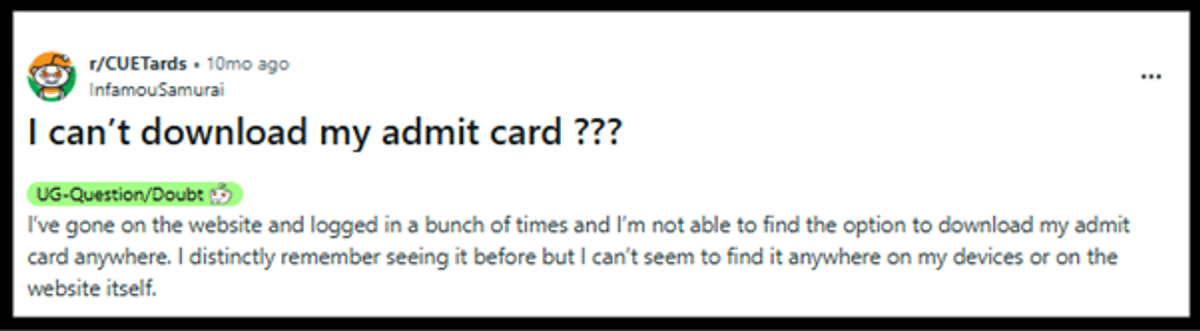
Source: Reddit
CUET UG 2026 Admit Card Errors FAQs
Ques. What should I do if my photo is not visible on the CUET UG admit card?
Ans. First, re-download the admit card after clearing browser cache. If the photo is still missing, contact NTA helpdesk at 011-40759000 immediately. An admit card without a photo is invalid for exam entry.
Ques. Is it possible to correct my name on the CUET UG 2026 Admit Card?
Ans. No, it is not possible to correct your name once the admit card has been released. You can only correct your name during the correction window. You can contact the NTA help desk for further information regarding this.
Ques. I found an error in the subject code on the CUET UG 2026 Admit Card. What do I do?
Ans. This is an important error, and you must not appear for the exam if there is an error in the subject code. You can contact the NTA help desk at 011-40759000 or 011-69227700 between 10 AM to 5 PM.
*The article might have information for the previous academic years, please refer the official website of the exam.